
Your Agent Fails Silently
Two SharePoint Framework web parts that make the failure visible: what your Copilot Studio agent can't read, and what it says on the wire when it calls an MCP server
- Two open-source web parts, merged into the PnP samples gallery
- Knowledge Source Health: what a Copilot Studio agent can't read in a SharePoint library
- Size tiers done right: 200 MB, or 512 MB for PDF, Word and PowerPoint
- "Not evaluated" instead of a false green when the data isn't there
- MCP Client: the 2026-07-28 revision on the wire, header by header
- A validating mock MCP server that runs inside the browser tab
About this session
When an AI agent fails, it usually doesn't tell you. There's no error: it answers confidently from less than you think it has, or it talks a protocol you can't see. This session shows two SharePoint Framework web parts that make those failures visible, both merged into the PnP samples gallery. Knowledge Source Health audits a SharePoint library against the documented limits of Copilot Studio knowledge sources: files over the size limit, sensitivity labels that block answers, spreadsheets semantic search can't index at cell level, and libraries over the 500-object cap, where Copilot Studio skips the rest without saying which items. MCP Client is a Model Context Protocol client on the 2026-07-28 revision, the one that removed the initialize handshake and Mcp-Session-Id and moved routing into headers. It ships with a validating mock server, so you can see exactly what goes on the wire, including what the client must refuse. Both run on a normal SharePoint page, as the signed-in user, with zero setup.
Inside the demo
- Demo data first: the web part scans a fabricated Policies library and reads 67% groundable, 3 blocking, 1 degraded, 2 informational. A 260 MB zip is blocked, a 340 MB PDF passes because PDF gets the 512 MB tier, and a spreadsheet labelled Highly Confidential is flagged twice.
- The library itself is blocking: 612 items is over the 500 knowledge object cap, and Microsoft Learn says Copilot Studio doesn't indicate which items it skipped. Every rule links to the Learn page that justifies it.
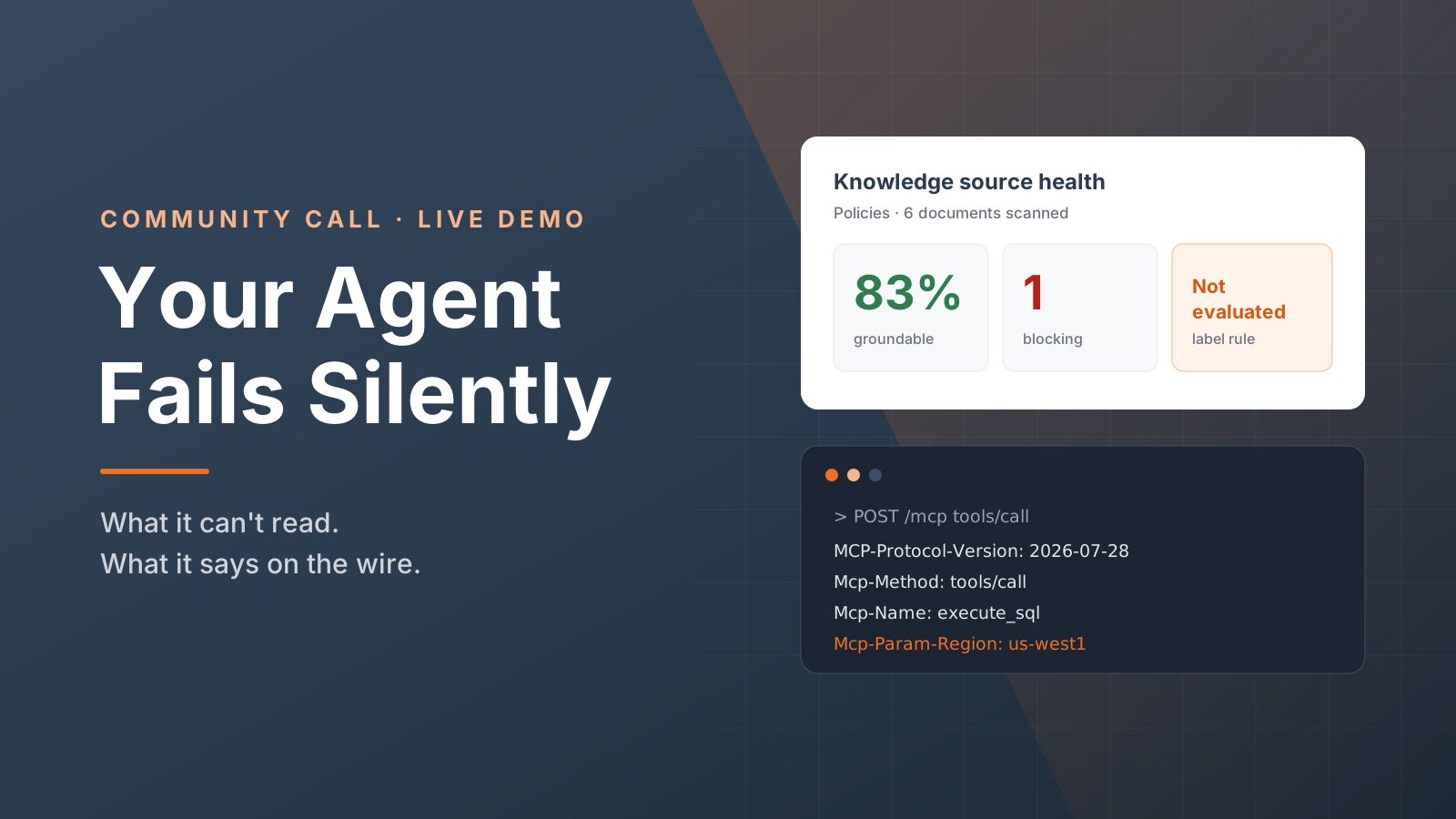
- Then real data, on a site built for the demo with real 340 MB and 260 MB files and real dates. Policies reads 83% groundable, and the sensitivity label rule is listed as not evaluated, because the library exposes no label column. Not evaluated is not a pass.
- An Archive library of 612 documents reads 100% groundable with one blocking finding. The percentage is per document, and the library-level blocker sits right next to it, so a green number never reads as an all-clear.
- MCP Client lists tools from the mock server: four offered, three shown. broken_tool puts an x-mcp-header routing annotation on an array, which the spec doesn't allow, so the client rejects it and says why.
- A tools/call to execute_sql shows the 2026-07-28 headers in the trace: MCP-Protocol-Version on every request, Mcp-Method and Mcp-Name for routing without parsing the body, and Mcp-Param-Region mirrored from the argument the server marked with x-mcp-header. Switch the region and the header follows.
- slow_report answers as server-sent events: two progress notifications, Reading rows and Formatting, arrive before the result. The client handles both response shapes.
Build it yourself
Clone and build
Both samples live in the PnP sp-dev-fx-webparts repo. Use Node 22, then npm install and npm run build in the sample folder. The build produces a .sppkg package in sharepoint/solution.
The samples on GitHubDeploy tenant-wide
Upload the .sppkg to the tenant app catalog and deploy it to all sites. Both solutions skip feature deployment, so the web parts are available everywhere with no per-site install. A new app catalog can take a few minutes before it accepts uploads.
Deploying an SPFx packageStart with demo data
Add Knowledge Source Health to any page. It starts in demo mode, so it shows a full scorecard straight away. Turn off Use demo data in the property pane, pick a library, and click Scan. Export CSV gives the site owner a to-do list.
Knowledge Source HealthList tools against the mock
Add MCP Client and click List tools. The mock server runs inside the browser tab, so nothing leaves the page. To use a real server, turn the mock off and paste your endpoint URL. If it needs auth, the token comes from the SharePoint Framework's Entra token provider as the signed-in user.
MCP Client
Slides
Resources
The web parts
- Knowledge Source Health in the Sample Solution Gallery→Audits a SharePoint library against the documented limits of Copilot Studio knowledge sources.
- MCP Client in the Sample Solution Gallery→A Model Context Protocol client on the 2026-07-28 revision, with an in-browser mock server.
- Source code on GitHub→react-knowledge-source-health and react-mcp-client in the PnP sp-dev-fx-webparts repo. Issues and pull requests welcome.
- Slides (PDF)→The eight slides shown around the two live demos.
The limits behind the rules
- Copilot Studio: unstructured data limits→The 500 knowledge object cap, sensitivity labels and synchronization frequency.
- Copilot Studio: knowledge sources→Tenant graph grounding with semantic search, and the 200 MB and 512 MB size tiers.
The protocol
- MCP 2026-07-28: Streamable HTTP transport→The stateless revision: no initialize handshake, no session ID, routing in headers.
- MCP 2026-07-28: x-mcp-header→How a server asks the client to mirror a parameter into a header, and when the client must refuse a tool.
From the speaker
Elliot Margot
Microsoft MVP - M365 Copilot & Copilot Studio