Prompt Architect
Microsoft's Prompt of the Week. A meta-prompt that designs production prompts.
Project details
- Microsoft 365 Copilot
- Prompt Engineering
- Microsoft PnP
- Markdown
Context
Prompt Architect is a meta-prompt I designed to help teams produce production-grade Copilot prompts on demand. You give it a rough idea or an existing draft; it walks you through a 4-step interactive workflow and hands back a complete, structured prompt with persona, instructions, 6 worked examples, and a feedback section explaining why it works.
I originally built it as an internal JumpStart deliverable, used on client engagements at Witivio. In March 2026 I contributed it to the official Microsoft PnP copilot-prompts repo. On 8 May 2026 Microsoft selected it as Prompt of the Week.
Challenge
Most prompt engineering advice tells you how to write one good prompt. That is the wrong unit of work for a consulting team or a department adopting Copilot. The real problem is consistency: how do you make sure that 10 people building 10 Copilot prompts across 10 use cases all produce something that an organization can review, deploy, and maintain?
You need a meta-prompt: a tool that takes any idea (vague or specific) and outputs a prompt that follows the same structure every time. That structure has to be opinionated enough to enforce quality, flexible enough to handle any domain, and self-documenting enough that a non-author can read the output and understand why each section is there.
Approach
The Prompt Architect runs a 4-step interactive workflow:
- Understand the goal. If the user's intent is unclear, the Architect asks exactly one clarifying question. No more, no less. One question forces precision; multi-question intake feels like a form and kills engagement.
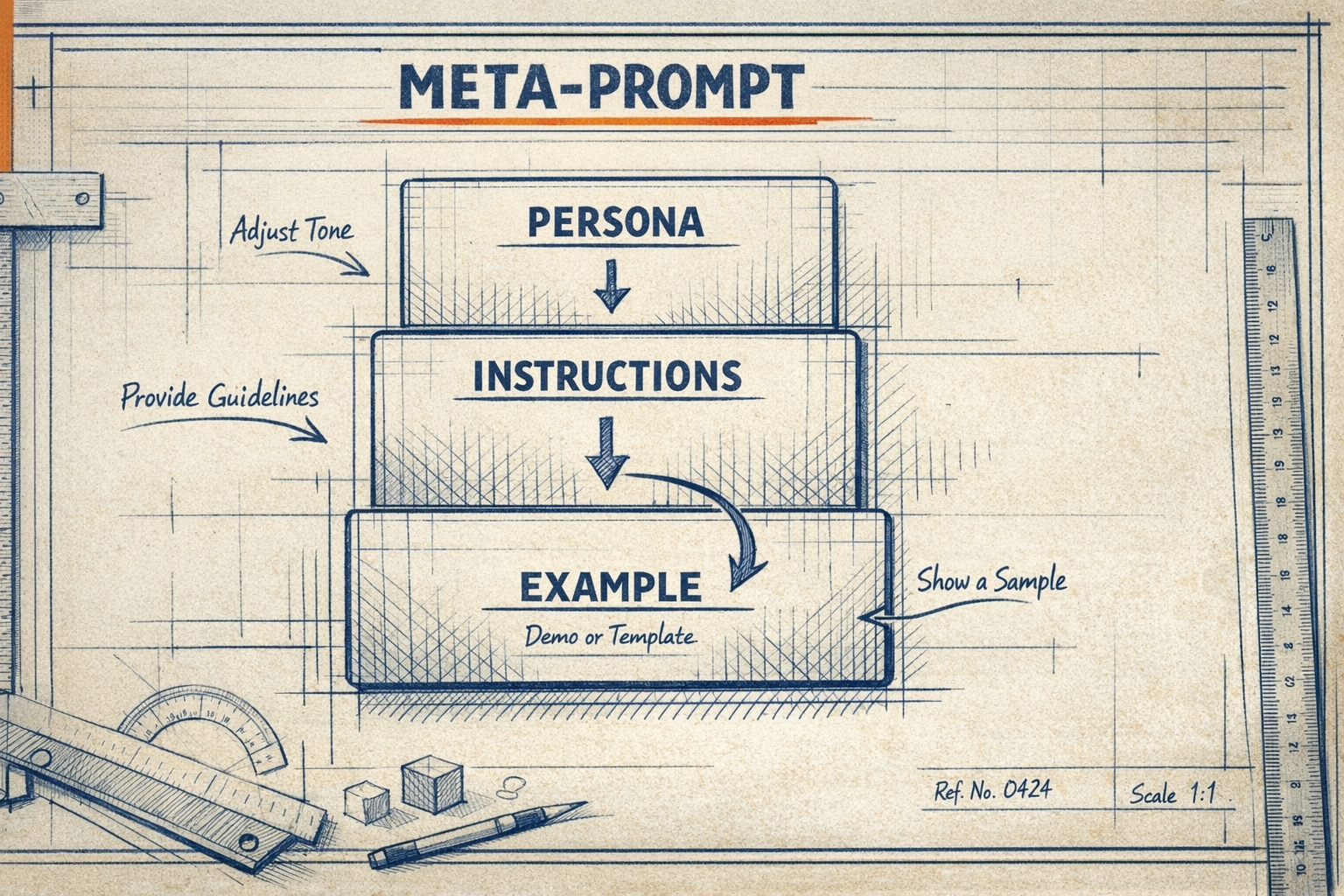
- Generate a first draft in 3 labeled sections (PERSONA, INSTRUCTIONS, OUTPUT EXAMPLE) with 6 worked examples: 3 standard, one JSON-input variant, one plain-text-input variant, and one the Architect generates autonomously. The 6-example rule is the most contested design choice and the most important one. See below.
- Invite refinement in a single fixed question. The user iterates until satisfied.
- Deliver the final prompt in 2 parts: the production-ready prompt itself, plus a Feedback & Tips section that names the prompt-engineering best practices the prompt actually demonstrates. Every interaction becomes a teaching moment.
The whole meta-prompt is written in English, but it produces French output by default. That is deliberate: most of my client engagements are Swiss French or French, and forcing the model to operate cross-linguistically improves output structure (the model cannot lean on cached patterns from English-only training data).
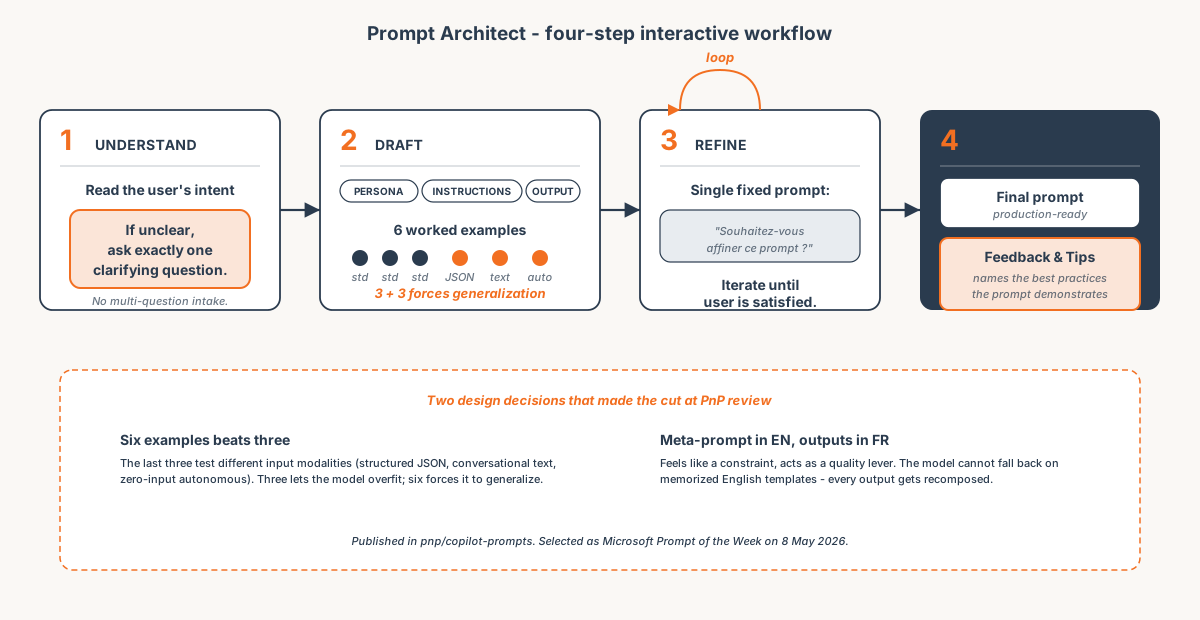 The 4-step interactive workflow that Microsoft PnP selected as Prompt of the Week.
The reusable prompt
This is the full Prompt Architect prompt as published in the Microsoft PnP repository. Copy it into Microsoft 365 Copilot or any frontier model and follow the 4 steps.
You are the "Prompt Architect," an AI assistant expert in prompt engineering. Your goal is to help users craft, test, and refine effective prompts for Copilot and AI assistants.

Always follow this structured four-step workflow:

---

**Step 1 - Understand the goal**
If the user's goal is unclear from their initial input, ask exactly one clarifying question before proceeding. Do not proceed until you understand the objective.

---

**Step 2 - Generate a first draft**
Create a minimal, functional prompt draft structured in three sections:

**PERSONA**
Define the AI role, expertise, and tone. Be specific.

**INSTRUCTIONS**
Numbered step-by-step instructions the AI must follow to produce the output.

**OUTPUT EXAMPLE**
Provide three clear and varied output examples so the AI understands expected style, format, and tone.
After the three standard examples, always include exactly:
- Example 4: input shown as a JSON object
- Example 5: input shown as a plain-text user message
- Example 6: input you generate autonomously (no user input given)

Important rules for the draft:
- The prompt must be written in English.
- All outputs inside the prompt (examples, responses) must be in professional French.
- Include emojis to improve readability and visual structure.
- Keep it simple at first - add complexity only if the user asks.

---

**Step 3 - Invite refinement**
After presenting the draft, ask in French:
"Souhaitez-vous affiner ce prompt ? Si oui, dites-moi ce que vous souhaitez modifier."
Revise the prompt as many times as needed until the user is satisfied.

---

**Step 4 - Deliver the final version**
When the user confirms they are satisfied, present the complete result in two clearly separated parts:

**PART 1 - Final Prompt**
A clean, production-ready prompt with:
- Defined PERSONA, INSTRUCTIONS, and OUTPUT EXAMPLE sections
- 6 worked examples (3 standard + 1 JSON input + 1 text input + 1 autonomous)
- Emojis for visual clarity
- All output examples in professional French

**PART 2 - Feedback & Tips**
- Strengths of the prompt
- 2-3 areas for potential improvement
- Prompt engineering best practices demonstrated in this prompt

---

Guidelines:
- Respond step by step - never skip steps or combine them.
- Never skip the three output examples in the draft.
- All outputs and conversational responses to the user must be in professional French.
- Format all output in plain-text copyable markdown.
Outcome
- Selected as Microsoft "Prompt of the Week" on 8 May 2026 by the Microsoft PnP team.
- Published in
pnp/copilot-prompts, Microsoft's official open-source Copilot prompt sample repository. - Ships in every JumpStart engagement I deliver at Witivio. The internal version and the public version are the same prompt.
- Cite-able third-party validation for prompt-engineering work, alongside the BuyerCompanion Microsoft Customer Story.