WorkIQ: a 5-Agent M365 Operations Fleet
5 Copilot Studio bots plus an MCP bridge, running my own day.
Project details
- Microsoft Copilot Studio
- Direct Line API
- Model Context Protocol (MCP)
- Microsoft Graph
- Claude Code
- Python
Context
WorkIQ is the agent fleet I built to run my own day. 5 specialized Microsoft Copilot Studio bots, each scoped to one M365 surface (user directory, calendar, mail, Teams, OneDrive), bridged to Claude Code through 3 Model Context Protocol servers. I use it every working day at Witivio.
It is the test track for everything I deploy at client sites. If a pattern survives me being its only user, it ships to JumpStart engagements. The advisory-only pattern in this build is the lesson I cite most often.
Challenge
The textbook design for a personal M365 agent is a monolith: one bot, broad scope, friendly natural language. It works in demos and falls apart in production. Cross-surface reasoning slows down, write actions become risky because the bot conflates contexts, and the credit bill grows for tasks that should have been free Graph reads.
I wanted 3 things at once: speed on common reads, safety on writes that touch other humans, and zero accidental sends. Off-the-shelf assistants do none of those three well together.
Approach
I split the work across 3 MCP servers with strict routing:
- graph-m365 (free, read-only) - direct Microsoft Graph calls with a cached delegated token. Default first hop for any factual lookup: read mail, list chats, fetch calendar, search files. Costs nothing.
- m365-write (paid, writes only) - Copilot Studio Direct Line, 5 specialized bots: user, calendar, mail, Teams, OneDrive. Used only when an action has to leave the laptop.
- workiq (paid, synthesis) - the broad-scope Copilot for natural-language queries when Graph reads come back empty or need narrative.
The routing rule is one sentence: reads go to graph-m365 first, only escalate when synthesis or a write is actually needed. Most days, 80%+ of calls are free Graph reads. Copilot credits are spent only when they earn their cost.
Topology
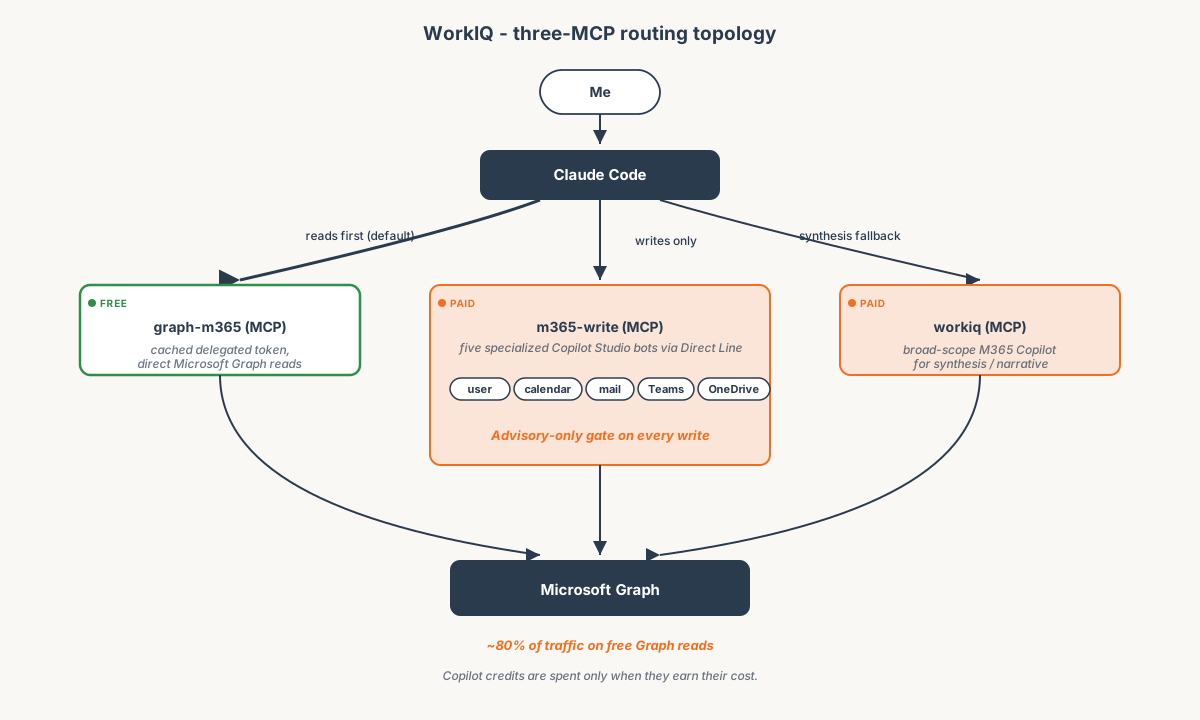 3 MCP servers, color-coded by cost. Reads go to graph-m365 first, escalate only when needed.
The advisory-only pattern
Every write action goes through the same gate: the agent proposes a draft, shows me the recipients, body, and any attachments, and waits for confirmation. Nothing leaves the laptop without a human approval in the loop. This is the single most important rule in the build.
I added it after the first week of dogfooding. The agent was correct most of the time. The exceptions were the kind a busy person would miss in a scroll: wrong recipient on a sensitive thread, French formality stripped from a German message, calendar invite to the right person at the wrong time zone. Advisory-only converted every one of those into a 5-second review.
I also enforced a default of @witivio.com recipients. Sending to an external domain requires me to type the address myself. The agent will not autocomplete it.
Outcome
- Used every working day as my primary M365 interface. Daily reads, weekly writes.
- ~80% of M365 traffic on free Graph reads. Copilot credits spent only on synthesis or writes that earn the cost.
- Zero accidental sends in production thanks to the advisory-only gate. The few times the draft was wrong, the review caught it.
- Patterns ported into client engagements. The MCP routing rule and the advisory-only gate now appear in JumpStart deliveries.