For enterprise developers, the out-of-the-box translation capabilities of LLMs are often insufficient for production-grade agents. While generative AI can translate on the fly, enterprises require deterministic control over terminology, legal disclaimers, and brand voice across different locales.
The challenge is avoiding the maintenance nightmare: duplicating every topic for every language. If you have 10 topics and 4 languages, you do not want 40 topics to maintain.
This post outlines a scalable architecture for building a multilingual agent with runtime language switching. The pattern was hardened on a production deployment for a global industrial client (English, French, Portuguese-BR, Czech), and the demo agent that produced the screenshots in this post extends the same architecture to eight languages: English, French, Portuguese (BR), Czech, Spanish, Dutch, German, and Italian. Every screenshot below comes from a single agent, single topic per intent, single GPT prompt - no duplication.
Pro Tip
Scope of this pattern: this post covers one specific multilingual strategy - a preselected set of supported languages (English plus seven peers) with custom regional behaviors layered on top. It deliberately leaves space for two adjacent patterns: auto-detection of the user's language, and production-grade support for languages Copilot Studio does not officially list (an upcoming platform feature will make this easier).
1. Establishing the Single Source of Truth
The foundation of a multilingual bot is a single global variable that dictates the agent's behavior for the duration of the session: Global.UserLanguage.
Copilot Studio exposes System.User.Language as a read-only system variable populated from channel context. When you need explicit user choice (the recommended path), store it in a custom global named Global.UserLanguage - custom globals use a single identifier after the prefix, no dots.
Language Detection Strategies
You have three primary options for initializing this variable at the start of a session:
- User Profile (Office 365 Locale): Fast, but often inaccurate. Users may be logged into a US tenant but prefer French.
- URL Parameters: Excellent for embedded web chats where the parent page already knows the locale.
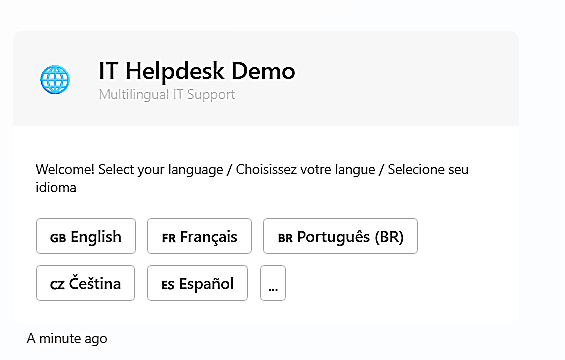
- Explicit Selection (Recommended): An Adaptive Card at the start of the conversation.
Why explicit selection? In enterprise environments, reliability beats magic. An explicit choice ensures the user is comfortable with the language and provides a clear trigger to set the variable. In Microsoft Teams specifically, the browser Accept-Language header is frequently overridden by the tenant locale setting - so a French user on a US-based tenant gets English. Do not rely on it.
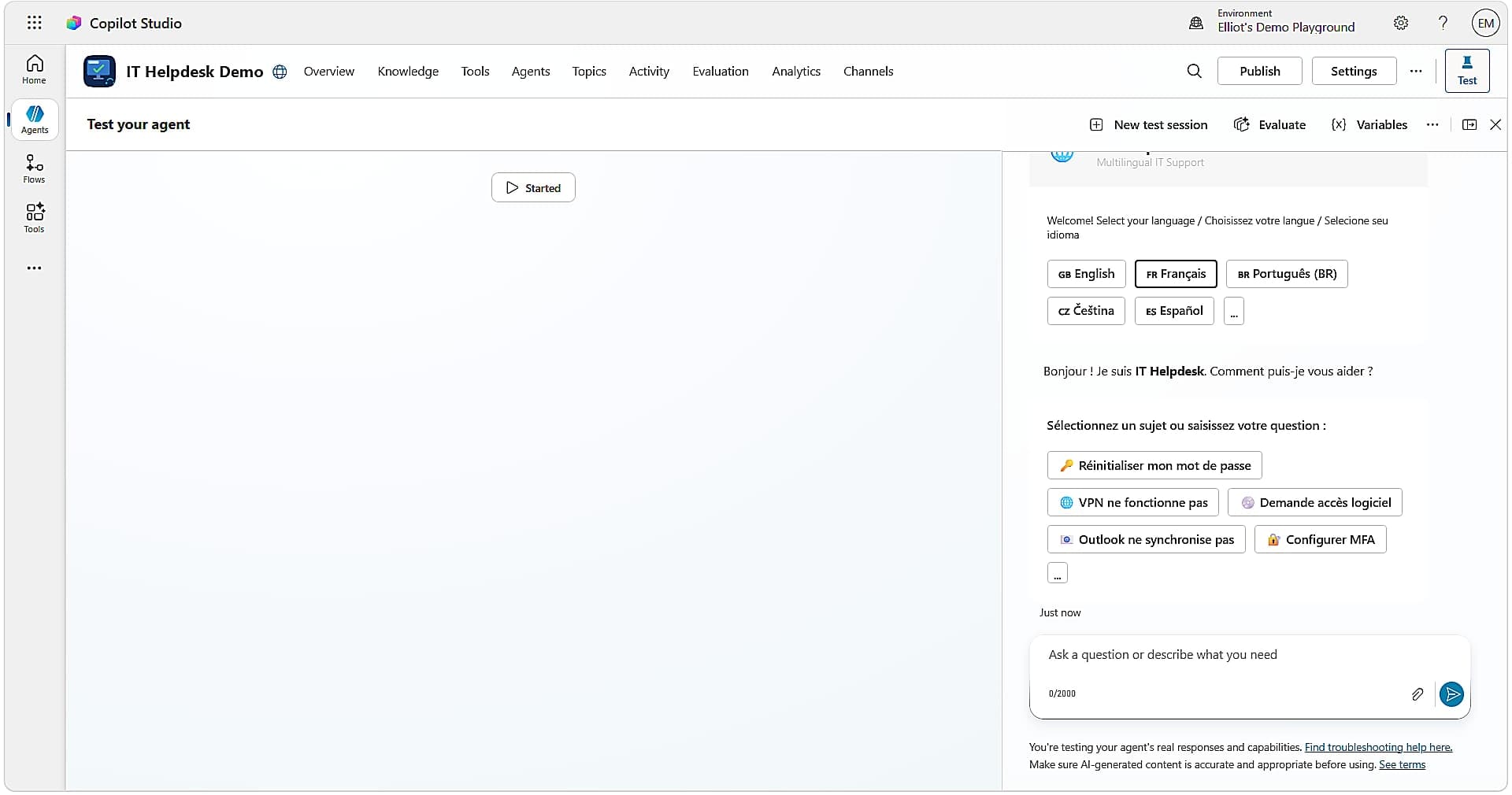
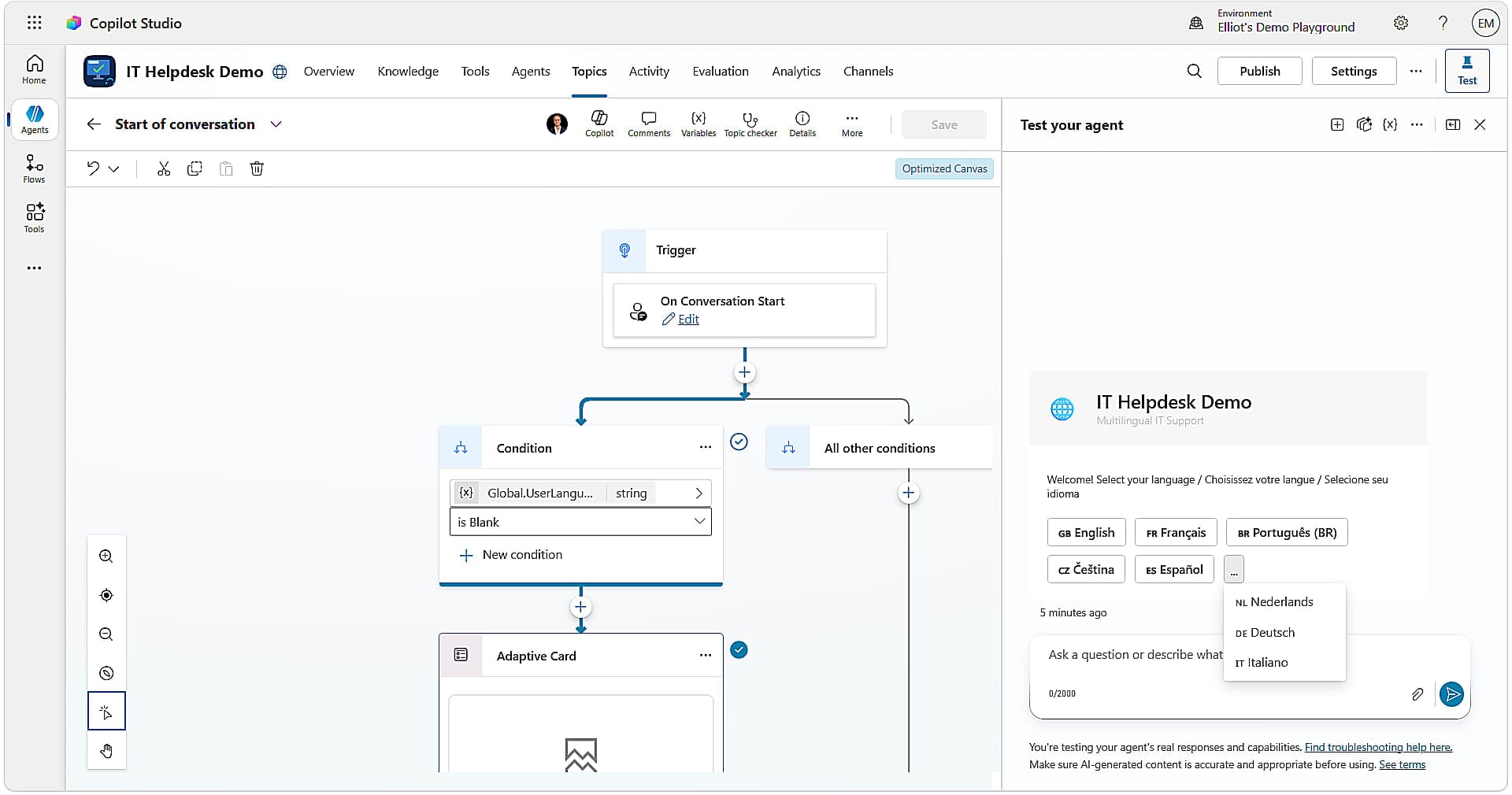
Initialize all of this in the System - Conversation Start topic. Override the default to: (1) check if Global.UserLanguage is blank, (2) if blank, send the language selection Adaptive Card and capture the choice, (3) set Global.UserLanguage, (4) route to the actual greeting topic.
When the user selects a language from the Adaptive Card, add a Set Variable action node in your topic. Set the variable to Global.UserLanguage. Set the value field to the card's output. In Copilot Studio's Ask with Adaptive Card node, the captured response is exposed as Topic.AdaptiveCardOutput (or whatever output variable name you configured on the node). For a card with a selectedLanguage choice input, the expression is:
Topic.AdaptiveCardOutput.selectedLanguageThere is no Set() function in Copilot Studio topic authoring - that is Power Apps canvas syntax. Power Fx in CS appears only inside the value fields of action nodes.
Normalize Language Codes
Channels are inconsistent. Teams may send "fr-FR", web chat may send "fr", some legacy connectors send "fr_FR". Normalize at the top of Conversation Start before storing. Use System.User.Language as the source:
Switch(
    Lower(Substitute(System.User.Language, "_", "-")),
    "fr", "fr-FR",
    "fr-fr", "fr-FR",
    "pt", "pt-BR",
    "pt-br", "pt-BR",
    "cs", "cs-CZ",
    "cs-cz", "cs-CZ",
    "es", "es-ES",
    "es-es", "es-ES",
    "nl", "nl-NL",
    "nl-nl", "nl-NL",
    "de", "de-DE",
    "de-de", "de-DE",
    "it", "it-IT",
    "it-it", "it-IT",
    "en-US"
)
In the eight-language demo agent, the language picker uses readable identifiers (English, French, Portuguese_Brazilian, Czech, Spanish, Dutch, German, Italian) rather than locale codes - friendlier to bind into card buttons and to reference in Switch() expressions across topics. Pick the convention that fits your stack and stay consistent.
2. Language-Aware UI: Adaptive Cards and Dynamic Text
Once Global.UserLanguage is set, avoid hard-coding strings in message nodes.
The JSON Switch Pattern
For complex Adaptive Cards, do not translate individual fields with nested If statements inside the card designer. Store your card JSONs as variables and switch the entire payload.
Add a Set Variable node targeting Global.varCurrentCard. Use this expression in the value field:
Switch(
    Global.UserLanguage,
    "English", Global.varCard_EN,
    "French", Global.varCard_FR,
    "Portuguese_Brazilian", Global.varCard_PT,
    "Czech", Global.varCard_CS,
    "Spanish", Global.varCard_ES,
    "Dutch", Global.varCard_NL,
    "German", Global.varCard_DE,
    "Italian", Global.varCard_IT,
    Global.varCard_EN
)
Two production constraints: (1) card JSON variables must be Global-scoped to persist across topics; (2) Power Fx string variables have a length cap that complex cards will breach. For cards over the limit, fetch JSON from a Power Automate flow or Dataverse row instead of inlining as a variable.
Alternative: single card + OOB localization. The pattern above ships one payload per language. If your cards are mostly static text with a few dynamic values, you can author one card and let the localization file workflow handle the strings - using the SetTextVariable trick to mix static text with variables inside a translatable string. That approach is covered in The One Card: Build Once, Speak All Languages. Choose payload switching when each language needs a structurally different card (different fields, different layouts, different actions); choose single-card-plus-localization when the only thing that changes is the words.
For simple text blocks, inline Power Fx works fine - but with a critical caveat. In a SendActivity node, the activity: field does not evaluate Power Fx expressions. A =Switch(...) expression placed directly in activity: will render as raw text. The fix is a two-step pattern: compute the localized string in a SetVariable node (where Power Fx is evaluated), then reference the resulting variable from SendActivity:
- kind: SetVariable
  id: compute_greeting
  variable: Topic.Msg
  value: =Switch(Global.UserLanguage, "French", "Bonjour", "Portuguese_Brazilian", "Olá", "Czech", "Ahoj", "Spanish", "Hola", "Dutch", "Hallo", "German", "Hallo", "Italian", "Ciao", "Hello")
- kind: SendActivity
  id: greet
  activity: =Topic.Msg
This pattern is what unlocks clean per-language replies in every system topic (Greeting, Goodbye, ThankYou, Escalate, Fallback, StartOver, EndOfConversation, ResetConversation) of the eight-language demo agent without duplicating any of them.
3. Topic-Level Routing vs. Topic Duplication
The anti-pattern: Creating Topic_Refund_EN, Topic_Refund_FR, Topic_Refund_PT, Topic_Refund_CS. This is an operational disaster. When a business rule changes, you update it in four places and miss at least one.
The recommended pattern: Conditional branching within a single topic.
For simple topics, use inline Switch as shown above. For complex topics with different business logic per region (different regulations, different backend calls), add a Condition node at the start:
This keeps logic centralized while allowing regional divergence where strictly necessary.
Cross-Lingual Intent: Letting Generative Orchestration Bridge Locale Mismatches
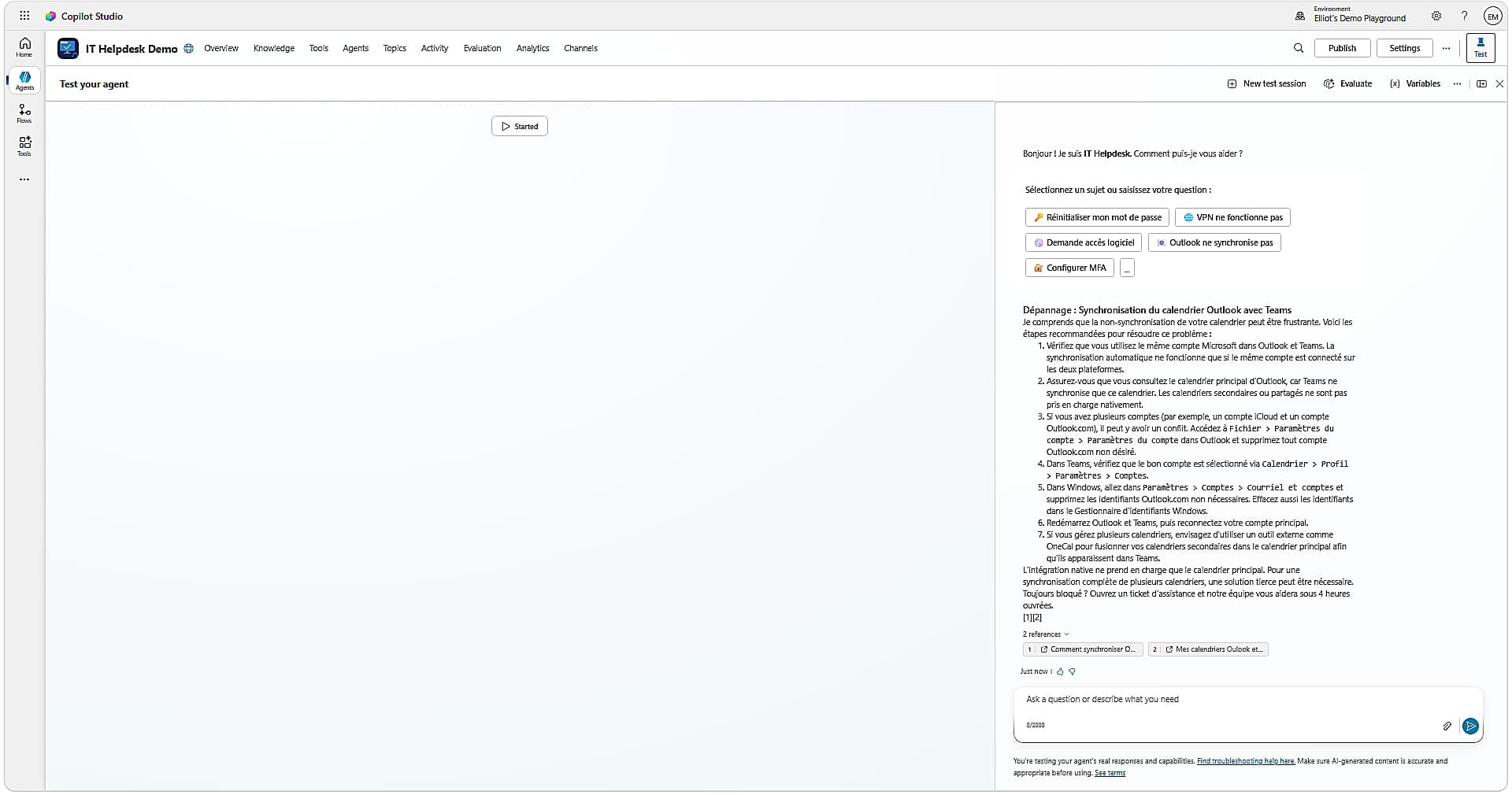
If a user is in an English session but asks a question in Czech, the generative orchestration engine can identify the intent and trigger the correct topic regardless of what Global.UserLanguage is set to.
The strategy: Do not build keyword-based language detection topics. Let generative AI handle intent mapping. Once a topic is triggered, your Global.UserLanguage variable ensures the response is delivered in the user's preferred language.
Pro Tip
Generative orchestration resolves what the user wants. Deterministic variables control how it is presented. Keep those two concerns separate and you gain both flexibility and reliability.
Choosing Between Inline Switch() and the OOB Localization File
Both patterns are valid. Pick by audience and by what changes per language. The two compose well: a production agent can use the OOB localization file for in-topic message strings owned by translators, and Switch() for runtime branching, system topics, and payload selection.
| Decision factor | Inline Switch() (this post) | OOB localization file |
|---|---|---|
| What changes per language | Logic + text | Text only |
| Who owns the strings | The builder (in the topic) | A translation team (in a .resx-style file) |
| Source of truth | Topic YAML (Git-diffable) | Separate localization file |
| Runtime branching on other variables (role, channel, tenant) | Yes | No - substitution only |
| Languages outside the officially supported set | Works (any string identifier) | Constrained to platform-supported locales |
| System topics, GPT instructions, conditional flows | Same Switch() shape everywhere | Mixed: file for messages, code for logic |
| Adaptive Cards | Switch entire payload per language | One card + SetTextVariable (see The One Card) |
Lessons from Production: The 4-Language Industrial Bot
The architecture above was first deployed for a global industrial client requiring EN, FR, PT-BR, and CS support in a single agent. The demo agent that produced the screenshots in this post extends the same pattern to eight languages (EN, FR, PT-BR, CS, ES, NL, DE, IT) without adding a single duplicated topic. The cost of going from 4 to 8 languages was a few extra entries in each Switch() and a few extra card payloads - not a refactor.
- Always define a fallback language. If a user provides an unsupported locale, default to English gracefully. An empty string in a card field is worse than the wrong language.
- Test with real tenant configurations, not local browser settings. The most common bug in multilingual Teams bots is a US-tenant overriding all locale signals. Your test environment must mirror production.
- Initialize all language card variables in Conversation Start. Storing each language's card JSON as a named global variable and initializing them centrally makes swapping content clean and testable. One author owns Conversation Start, translators own the card JSONs.
- Czech is an edge case - and it has friends. Character encoding (diacritics) in adaptive card JSON strings requires careful escaping. Test
ž,š,čexplicitly. The same care applies to German umlauts (ä,ö,ü,ß), Spanish (ñ,á,é,í,ó,ú), and Portuguese (ã,ç,õ). activity:does not evaluate Power Fx. If you see=Switch(...)rendered as plain text in your bot, you put the expression inSendActivity.activityinstead of computing it in a precedingSetVariable.value. The fix is mechanical - lift the expression up.- Test all language paths via the test pane variable override. Set
Global.UserLanguageto each target locale before triggering topics. The Copilot Studio Kit's automated test runner can do this systematically across all eight languages on every PR.
4. Session Management and Inactivity Reset
When the Reset Conversation system topic fires, all conversation-scoped variables are cleared. If a user returns after a break, Global.UserLanguage will be blank.
The pattern: Do not blindly clear everything. Instead:
- Clear transient variables (transaction IDs, search results, temp state).
- Check if
Global.UserLanguageis blank. - If blank, trigger the language selection Adaptive Card.
- If set, preserve it and greet the user in their language.
Summary Checklist
| Area | Anti-pattern | Recommended pattern |
|---|---|---|
| Topic structure | Duplicate topics per language | Single topic with Switch or Condition nodes |
| Language detection | Browser / Teams locale | Explicit Adaptive Card selection |
| UI content | Hard-coded strings | Power Fx Switch or JSON payload switching |
| Intent handling | Keyword-based language routing | Generative orchestration + deterministic response |
| Session state | Reset Conversation without language preservation | Selective reset preserving Global.UserLanguage |
| Persistence | Store language in user-scoped var | Re-ask at session restart |